how to register your dog in Mumbai through the official BMC citizen portal without paying middlemen. This complete step-by-step guide explains the legal "Tax on Dogs" process, the strict MSVC/VCI veterinary requirements, the mandatory Leptospirosis vaccination rule unique to Mumbai, and how to digitize your final civic license into a scannable QR code using PetEYE.
1. Why You Shouldn’t Pay for Registration Services
The Brihanmumbai Municipal Corporation (BMC) enforces some of the strictest civic pet licensing protocols in India. Because the official terminology can be confusing (the BMC refers to it legally as a "Tax on Dogs"), many third-party services charge steep premiums to navigate the paperwork for you.
You do not need to pay them. The BMC citizen portal allows you to file directly. However, there is a "hidden" medical requirement that causes most independent applications to get rejected. This guide will show you exactly how to bypass the confusion and secure your license.
👉 Got your BMC license? Don't carry paper receipts around. Upload your government license and vaccination records to PetEYE to generate a free Digital ID. Next time a housing society or vet asks for proof, just show them your PetEYE QR code. Create your Free Digital ID Here
2. What You Need Before You Start
Do not start the BMC application until you have these specific details ready. If you are missing even one, your application will fail:
- Your Exact Ward: You must know your specific BMC Ward number/letter.
- The "Lepto" Certificate (Crucial): Unlike other cities, Mumbai legally requires proof of a Leptospirosis Vaccination, not just Anti-Rabies! You need certificates for both.
- Veterinary VCI Number: You must provide your veterinary doctor’s exact MSVC/VCI Registration Number.
- Scanned PDFs (Under 2MB): You need digital copies of your Address Proof and both vaccination certificates. They must be under 2MB in size.
3. Step-by-Step BMC Registration Guide
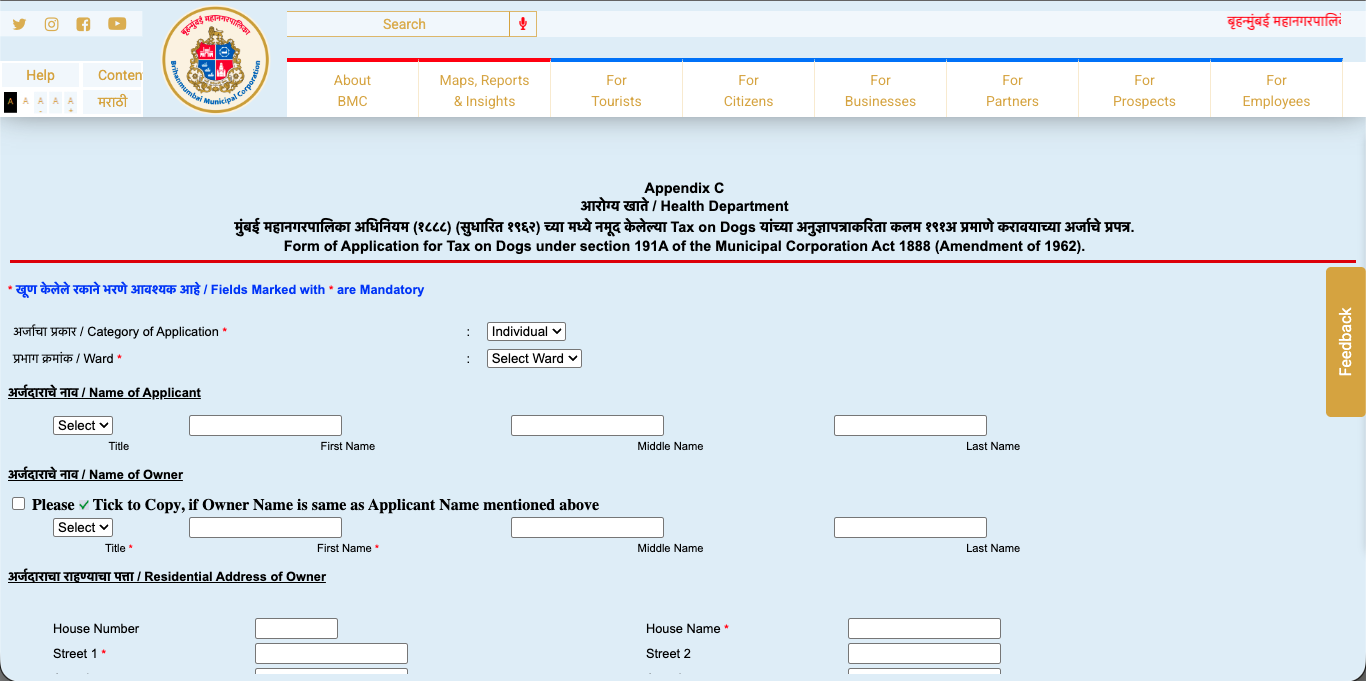
Step 1: Access the "Tax on Dogs" Portal Visit the official BMC Citizen portal and navigate to the Health Department section. Look for the form titled: Form of Application for Tax on Dogs under section 191A of the Municipal Corporation Act 1888.
Step 2: Fill in Applicant Details Select your Category of Application (e.g., Individual) and your specific Ward. Enter the Applicant's Name and the Owner's Name (there is a checkbox to copy the name if they are the same). Enter your full Mumbai residential address.
Step 3: The Medical & Origin Declaration Scroll down to the Dog Details section. Enter your dog's Name, Breed, Color, and Identification Marks.
- The Medical Entry: Carefully enter the exact dates for both the Rabies Vaccination and the Leptospirosis Vaccination. You must also enter your Vet's Name and their MSVC/VCI Registration Number.
- The Origin Questionnaire: The BMC requires you to declare how you acquired the dog. You must select "Yes" for at least one option (e.g., Is Dog being Bought? Whether Stray Dog adopted? Whether Dog brought from outside Mumbai?).
Step 4: Upload Documents Click "Choose File" to upload your Rabies Certificate, Leptospirosis Certificate, and Address Proof. Ensure all files are under the 2MB limit. Click Upload File and then hit Continue to finalize your application and pay the civic dog tax.
4. What to do after you get your BMC License
A digital PDF from the BMC is great for the government, but it is a hassle in daily life. When your apartment's Resident Welfare Association (RWA) or a boarding kennel asks for proof of your dog's vaccination and municipal registration, scrolling through your phone to find a PDF is frustrating.
The Solution: Create a free PetEYE account. Upload your new BMC license and your veterinary records into your PetEYE Digital Wallet. The system will automatically generate a single, tamper-proof QR Code pass on your phone. Whenever someone asks for proof that your dog is safe and legally registered in Mumbai, just show them the QR code.
For policy inquiries, municipal collaboration discussions, or institutional whitepapers, contact KR PET EYE LLP at:corporate@krpeteyellp.com

Koushik Gaja
Managing Partner
Koushik Gaja is an entrepreneur, researcher, and author. An alumnus of the University of Glasgow, he currently directs his business ventures as the Managing Partner of KR PET EYE LLP. Alongside his entrepreneurial work, his research and writing focus on human behavior and reflection, leading to the publication of his books, Pause: What Happens Between Impulse and Action and The World Just Is.